Posts

Showing posts with the label SAP AR3

FUNCTION MODULES

Image
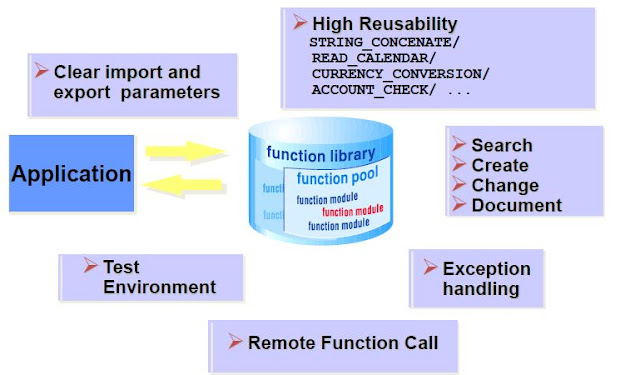
FUNCTION MODULES Module Objectives Define Function Modules Define Function Groups Describe Function module Parameters Explain Exception Processing Define global data / local memory Use Remote Function Call (RFC) Search the Function Library Introduction to Function Modules •Function modules are procedures that are defined in special ABAP programs, so-called function groups, that can be called by all ABAP programs. •Function groups act as containers for function modules that logically belong together. •Function modules also play an important role during updating and in the interaction between different SAP systems, or between SAP systems and remote systems through remote communications. function module Navigating to Function Modules (SE37) Navigating to function Modules Navigating to Function Modules (ADT) Navigation to function Modules Function Groups Function Groups function groups Calling a Function Module Calling a function module Parameters Parameters Exception Processing Exceptions...
SAP ERP ABAP DEBUGGING

Image
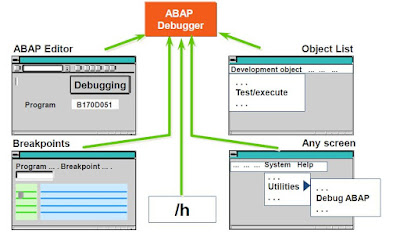
Module Objectives •Define debugging •Describe branching to debugging mode •Define key debugging concepts and functions •Explain the debugging mode •Describe examining/changing variables •Debugging in ADT •Identify breakpoints and watchpoints •Debug internal tables What is Debugging? •Tool used to identify and eliminate errors in ABAP programs •Allows the verification of program logic in a step-by-step manner by examining the results of individual statements Branching to Debugging Mode ABAP Debugging Key Debugging Concepts •Debugger modes •Examining the value of variables •Changing the value of variables •Setting breakpoints •Setting watchpoints •Viewing contents of internal tables Classic Debugging Display Below is the screen shot of how the debugger looks like. Classic Debugging Display Important Debugging Functions Single Step   -Processes the next program line Execute        -Allows the change of data contents during debugging Continue      -Pr...

online Classes of SAP ERP ABAP 7.4 CONTROL STATEMENTS

Image
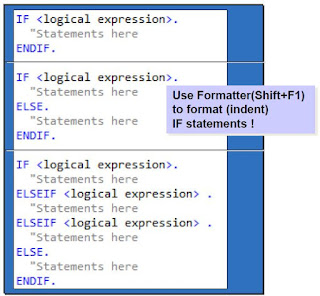
Module Objectives •Define Relational Operators •Explain Logical Expressions •Describe IF, CASE, SWITCH and COND statements •Explain DO and WHILE loops •Define CHECK, EXIT, and CONTINUE statements for use with loops IF Statement In every Programming language, we need conditional based code in ABAP, we use IF statement when we want to execute certain code based on any condition. for example, if the payment method is selected as credit card we want the particular code to execute and if payment method selects as cash we want some other code to execute. IF statements code Sample Relational Operators in order to compare variables we need some logical and relational operators which we can use to check the conditions and make decisions. for example, if the payment method is equal  Cash then we want the certain code to execute. to check if selected payment type is cash or not we use relational operators. Relational Operators Note: It is recommended to use symbols for relational op...

SAP ERP ABAP DEVELOPMENT TOOLKIT (ADT) NAVIGATION in Eclipse Luna

Image
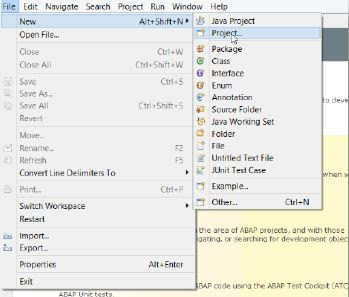
Connecting to SAP ERP system in Eclipse Luna open Eclipse Luna click on file -> new -> project Select the ABAP Project Now click on Browse to check the valuable connections. now Click on Define Manually radio button and insert the Properties of connection  now enter the login client , user and password which is provided to you by SAP basis team. Since we are creating an ABAP project this will open a ABAP perspective. Perspective gives you an option to work in different areas of Eclipse, Now you are ready with your project and connected to your box Coding ABAP in Eclipse Luna Navigation open Eclipse and click on file -> new -> ABAP program Enter the required information like Project name, Packages , Name and description and click next Select a transport request / create a new request/ or enter a request number. In $TMP package, it is not needed to use a request number You are now ready to code and launch in Eclipse Luna! Enter a write statement as per the example and exe...

NAVIGATION IN SAP GUI

Image
Module Objectives Explain how to log on to SAP Discuss navigation techniques Describe basic R/3 transactions Define an R/3 session Describe several general system functions Describe attributes of SAP Help Navigation – SAP Easy Access Logging On to SAP Double-click the SAP LOGON icon on the Windows desktop Select appropriate server from list. Click on the Logon button. Logging On to an SAP Client 1.Enter appropriate client number 2.Enter appropriate user id 3.Enter appropriate password Navigation A transaction is the smallest step that can be executed by the user to facilitate SAP session management & transaction processing. 4 - 20 character transaction codes are commonly used to quickly access specific screens in SAP. Transaction codes are entered/typed in the Command field. Example Transaction Codes: SE01 – Transport Organizer SE11 – ABAP Dictionary ST22 – ABAP Runtime Errors SM04 – Overview of Users OK Field Commands: /o – Lists user’s sessions /oxxxx – Creates a new session and ...