Posts

Showing posts with the label OOP

BACKGROUND PROCESSING
Image
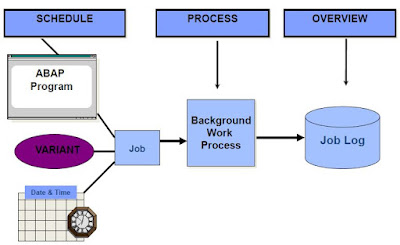
BACKGROUND PROCESSING Describe the process flow of background jobs Define the scheduling and processing of background jobs Describe the job results for a job log and spool requests Define the authorization objects Describe the automatic generation of jobs Define the function modules for generating jobs Characteristics Execution of ABAP programs without dialog (no specific job-control language for operating system required) Complete integration in the SAP System Parallel background and online operation Ease of use Distributed processing Process Flow Overview Process Flow Processing Jobs – Job Status Scheduled Released Ready Active Finished or Cancel Authorizations and Background Processing Authorization and background Processing Function Modules for Generating Jobs OB_OPEN JOB_SUBMIT OB_CLOSE Job Wizard You can use the Job wizard to schedule a background job. Let us go through the steps to do this. Transaction SM36 is listed below. Click the Job wizard button. The Job Wizard is displaye...

SUBROUTINES

Image
Module Objectives Define and call subroutines Define and use parameters Define global and local data Defining and Calling Subroutines  Defining a Subroutine: FORM subroutine USING lp1 lp2. ... ... ENDFORM. Calling a Subroutine: PERFORM subroutine USING f1 f2. Using Parameters to Pass Data CHANGING  Pass By Value & Result USING Pass By Reference   Pass By Value  TABLES   Pass By Reference  Parameters Example parameter  

ABAP UNIT

Image
Module Objectives Purpose of ABAP Unit Creating Unit Tests Fixture Methods ABAP Unit Test Class Wizard ABAP Unit Test Classes in ADT Purpose of ABAP Unit ABAP Unit is part of the test landscape for ABAP programs. ABAP Unit lets you implement unit tests. ABAP unit tests are methods of specially designated ABAP classes. Test methods work as scripts, with which code under test can be run, and with which the results of a test can be evaluated. ABAP unit lets you test the code at unit level, independent of the entire solution. Creating Unit Tests ABAP unit tests are implemented in the form of test methods in local test classes in any ABAP programs. The expected results are checked with static methods of help class CL_ABAP_UNIT_ASSERT or CL_AUNIT_ASSERT . Unit test Test Properties Risk Level Harmless – the test does not affect any existing processes and/or Database data. Dangerous– the test will change Database or Persistent Data Critical – the test will affect customizing data Duration Sh...

OOP

Image
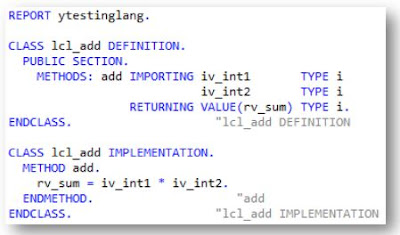
OOP Understand the details of object-oriented syntax elements in ABAP Objects and use these effectively Create object-oriented models of business applications Use the tools in the ADT 2.70 to develop object-oriented applications what problems we were having in Procedural programming. Long code due to variable declaration Extensive processing after SQL statement Multiple Commands to perform simple operations Code reusability and Maintenance SAP’s solution In-line declaration SQL Expressions ABAP Expressions OOP Advantages of OOP over Procedural programming Improved software structure and consistency in the development process Reduced maintenance efforts and less susceptibility to errors Better integration of the customer/user into the analysis, design, and maintenance process Easier and safer possibilities for extending the software OOP in ABAP Essentially the same as those of other modern object-oriented languages like C++ or Java Some elements present in ABAP objects are not offered i...

BASIC ALV

Image
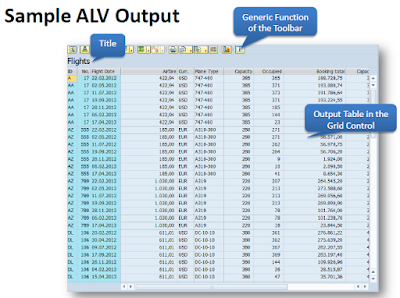
BASIC ALV •Define and describe ALV •Discuss and use the standard function module ‘REUSE_ALV_GRID_DISPLAY’ in ABAP program •ALV Navigation Define and Describe ALV The ALV (ABAP List Viewer) is a flexible tool for displaying lists in SAP. The tool provides common list operations as generic functions and can be enhanced by user-defined options. This allows you to use the ALV grid control in a wide range of application programs. For this module, the simplest way to use ALV will be discussed. Advanced topics in ALV may be discussed in the later part of the Training. Sample ALV Output Sample ALV output The ALV Field Catalog The field catalog is an internal table which contains information about the fields to be displayed on the ALV. The type is SLIS_T_FIELDCAT_ALV. We must first build the field catalog before displaying any output in the ALV. There are many fields in the field catalog but for a simple output, the only necessary fields are FIELDNAME and SELTEXT_L. Using the FM ‘REUSE_ALV_GRID...

SAP ERP ABAP SIMPLE OUTPUT STATEMENTS

Image
Module Objectives •Explain the WRITE statement •Define text symbols •Use system fields •ABAP Expressions for WRITE Processing Review on How to create an ABAP Program The WRITE Statement Text Symbols Text symbols have the advantage of being translated to different languages depending on the logon language without further coding. After maintenance, save and activate the text symbols. System Fields •System fields are variables filled by the ABAP runtime environment and can be used in an ABAP program to know system statuses. •They should only be accessed on a read-only basis and not modified during runtime. Examples: sy-datum – system date sy-datlo – user local date sy-uname – user name sy-langu – SAP logon language key sy-uzeit – system time sy-timlo – user local time sy-repid – current ABAP program sy-sysid – current SAP system ABAP Expressions for WRITE Processing Using String Templates •String templates enables us to create a new character string out of literal texts and embedded expre...