Posts

Showing posts with the label ERP. DEVELOPMENT TOOLKIT

INTRODUCTION TO SAP WEB DYNPRO
Image
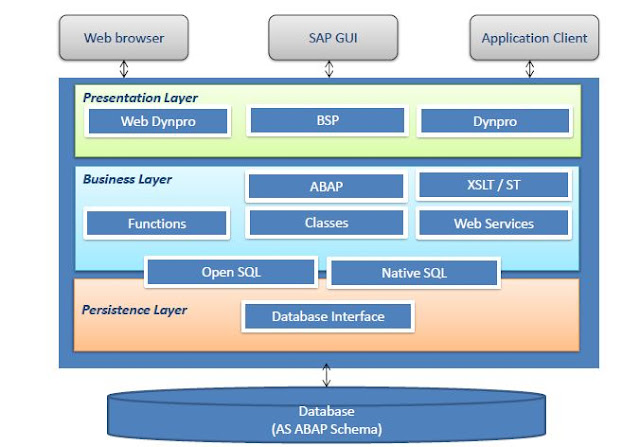
Web Dynpro is SAP’s standard UI technology for developing business applications with Web-based user interfaces.the web Dynpro is consists of a runtime environment and graphical development environment and tools that are integrated into the ABAP workbench.SAP Web Dynpro is based on original MVC design for decoupling presentation and application logic.Windows, Views, UI elements, Layouts, and Controllers form the basic components of a Web Dynpro application.Data binding is the means by which data is automatically transported from a view controller’s context to a UI element in its layout.Specific iViews should be created in order to run a Web Dynpro ABAP application within SAP enterprise portal.All WDA components, applications, and parts of the component are integrated parts of the standard correction and transport system (CTS).The standard ABAP lifecycle concepts fully apply to all Web Dynpro-based applications. Objectives goals: Explain the significance of Web Dynpro along with the We...
ABAP PROGRAMMING OVERVIEW

Image
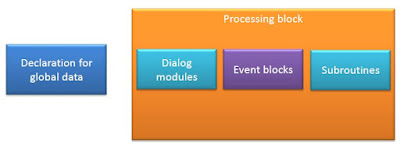
Module Objectives Explain program structure Discuss both current and obsolete ABAP events Overview on classic ABAP Comments Program Structure Classic ABAP Program structure ABAP Events Commenting Programs

SAP ERP ABAP DEVELOPMENT TOOLKIT (ADT) NAVIGATION in Eclipse Luna

Image
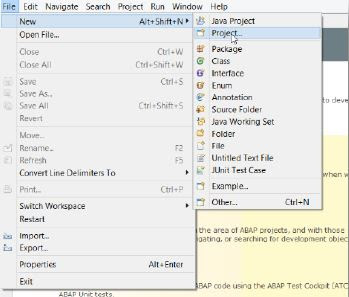
Connecting to SAP ERP system in Eclipse Luna open Eclipse Luna click on file -> new -> project Select the ABAP Project Now click on Browse to check the valuable connections. now Click on Define Manually radio button and insert the Properties of connection  now enter the login client , user and password which is provided to you by SAP basis team. Since we are creating an ABAP project this will open a ABAP perspective. Perspective gives you an option to work in different areas of Eclipse, Now you are ready with your project and connected to your box Coding ABAP in Eclipse Luna Navigation open Eclipse and click on file -> new -> ABAP program Enter the required information like Project name, Packages , Name and description and click next Select a transport request / create a new request/ or enter a request number. In $TMP package, it is not needed to use a request number You are now ready to code and launch in Eclipse Luna! Enter a write statement as per the example and exe...