Posts

Showing posts with the label ABAP controls

INTRODUCTION TO SAP WEB DYNPRO
Image
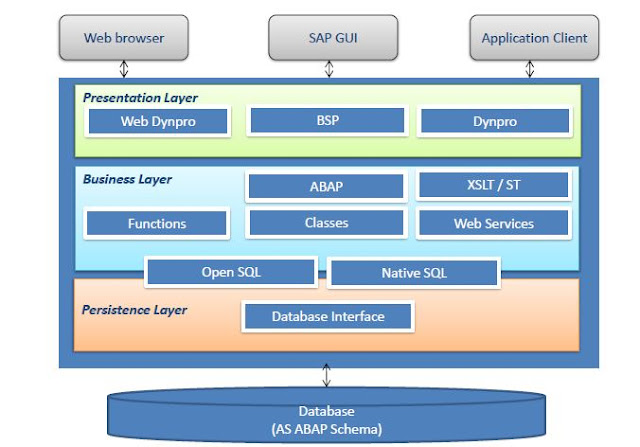
Web Dynpro is SAP’s standard UI technology for developing business applications with Web-based user interfaces.the web Dynpro is consists of a runtime environment and graphical development environment and tools that are integrated into the ABAP workbench.SAP Web Dynpro is based on original MVC design for decoupling presentation and application logic.Windows, Views, UI elements, Layouts, and Controllers form the basic components of a Web Dynpro application.Data binding is the means by which data is automatically transported from a view controller’s context to a UI element in its layout.Specific iViews should be created in order to run a Web Dynpro ABAP application within SAP enterprise portal.All WDA components, applications, and parts of the component are integrated parts of the standard correction and transport system (CTS).The standard ABAP lifecycle concepts fully apply to all Web Dynpro-based applications. Objectives goals: Explain the significance of Web Dynpro along with the We...
BACKGROUND PROCESSING

Image
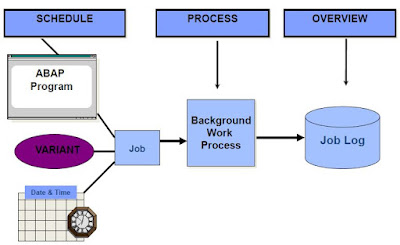
BACKGROUND PROCESSING Describe the process flow of background jobs Define the scheduling and processing of background jobs Describe the job results for a job log and spool requests Define the authorization objects Describe the automatic generation of jobs Define the function modules for generating jobs Characteristics Execution of ABAP programs without dialog (no specific job-control language for operating system required) Complete integration in the SAP System Parallel background and online operation Ease of use Distributed processing Process Flow Overview Process Flow Processing Jobs – Job Status Scheduled Released Ready Active Finished or Cancel Authorizations and Background Processing Authorization and background Processing Function Modules for Generating Jobs OB_OPEN JOB_SUBMIT OB_CLOSE Job Wizard You can use the Job wizard to schedule a background job. Let us go through the steps to do this. Transaction SM36 is listed below. Click the Job wizard button. The Job Wizard is displaye...

OOP

Image
OOP Understand the details of object-oriented syntax elements in ABAP Objects and use these effectively Create object-oriented models of business applications Use the tools in the ADT 2.70 to develop object-oriented applications what problems we were having in Procedural programming. Long code due to variable declaration Extensive processing after SQL statement Multiple Commands to perform simple operations Code reusability and Maintenance SAP’s solution In-line declaration SQL Expressions ABAP Expressions OOP Advantages of OOP over Procedural programming Improved software structure and consistency in the development process Reduced maintenance efforts and less susceptibility to errors Better integration of the customer/user into the analysis, design, and maintenance process Easier and safer possibilities for extending the software OOP in ABAP Essentially the same as those of other modern object-oriented languages like C++ or Java Some elements present in ABAP objects are not offered i...

Online Classes SAP ERP ABAP Data

Image
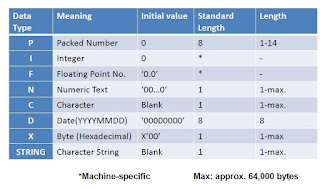
SAP ERP ABAP 7.4 (Object oriented) DATA •Define variables with the DATA statement •Define constants •Apply type conversions •Explain arithmetic expressions •Perform date calculations •Use parameters (checkboxes and radio buttons) •Create selection screen boxes Predefined Data Types and Their Attributes Predefined Data Types and Their Attributes in SAP ABAP we have many type of data type to hold the value into the variables, from above table you can have a idea about the data type and meaning of datatype. Type-Specific Output below chart will give us the idea about type Specific output. Data Types in ABAP like other programming languages SAP ABAP have data types, which are divided into two categories, Elementary and structured, the Structured is further divided into Structure and internal table. Data Declaration - DATA Statement To store values in any variable we need to do the data declaration, we can only assign a value to a variable if the contain and value have the same datatype. R...