Posts

Showing posts with the label SAP ERP

BASIC ALV

Image
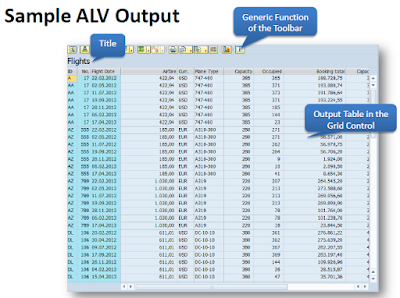
BASIC ALV •Define and describe ALV •Discuss and use the standard function module ‘REUSE_ALV_GRID_DISPLAY’ in ABAP program •ALV Navigation Define and Describe ALV The ALV (ABAP List Viewer) is a flexible tool for displaying lists in SAP. The tool provides common list operations as generic functions and can be enhanced by user-defined options. This allows you to use the ALV grid control in a wide range of application programs. For this module, the simplest way to use ALV will be discussed. Advanced topics in ALV may be discussed in the later part of the Training. Sample ALV Output Sample ALV output The ALV Field Catalog The field catalog is an internal table which contains information about the fields to be displayed on the ALV. The type is SLIS_T_FIELDCAT_ALV. We must first build the field catalog before displaying any output in the ALV. There are many fields in the field catalog but for a simple output, the only necessary fields are FIELDNAME and SELTEXT_L. Using the FM ‘REUSE_ALV_GRID...
SAP ERP ABAP DEBUGGING

Image
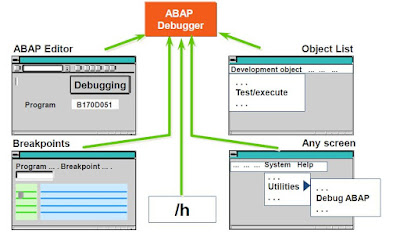
Module Objectives •Define debugging •Describe branching to debugging mode •Define key debugging concepts and functions •Explain the debugging mode •Describe examining/changing variables •Debugging in ADT •Identify breakpoints and watchpoints •Debug internal tables What is Debugging? •Tool used to identify and eliminate errors in ABAP programs •Allows the verification of program logic in a step-by-step manner by examining the results of individual statements Branching to Debugging Mode ABAP Debugging Key Debugging Concepts •Debugger modes •Examining the value of variables •Changing the value of variables •Setting breakpoints •Setting watchpoints •Viewing contents of internal tables Classic Debugging Display Below is the screen shot of how the debugger looks like. Classic Debugging Display Important Debugging Functions Single Step   -Processes the next program line Execute        -Allows the change of data contents during debugging Continue      -Pr...

Online Classes SAP ERP ABAP MESSAGE Statement

Image
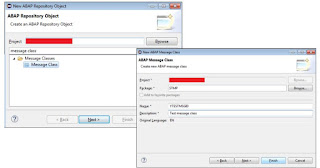
MESSAGE Statement •Messages can be stored in message classes or message IDs. The main purpose of this message class is reusability and readability. •To use a message in a specific message class, the message ID should be defined in the REPORT statement. Message Statement Adding Messages MESSAGE Statement •The message statement can have following variants:     •MESSAGE ‘Enter text here’ TYPE T.     •MESSAGE Tnnn.     •MESSAGE Tnnn WITH <f1>. Where T is a single character message type, nnn is the 3 digit message number in the specified message ID, <f1> is a variable in the program to replace ‘&’ in the message created in the message ID. Message Report the below example will show how can we show the message into ABAP report. Message Example the below example show how can we show the use parameters Message and show in ABAP report. Parameters Message Example Qualifying an Online Message Qualifying on online message