Posts

Showing posts with the label ABAP DEBUGGING

INTRODUCTION TO SAP WEB DYNPRO
Image
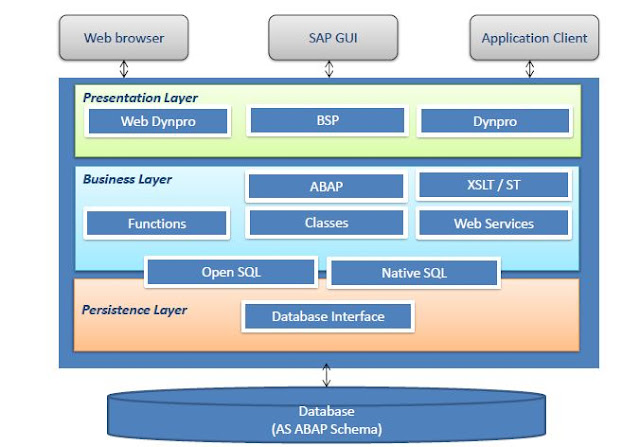
Web Dynpro is SAP’s standard UI technology for developing business applications with Web-based user interfaces.the web Dynpro is consists of a runtime environment and graphical development environment and tools that are integrated into the ABAP workbench.SAP Web Dynpro is based on original MVC design for decoupling presentation and application logic.Windows, Views, UI elements, Layouts, and Controllers form the basic components of a Web Dynpro application.Data binding is the means by which data is automatically transported from a view controller’s context to a UI element in its layout.Specific iViews should be created in order to run a Web Dynpro ABAP application within SAP enterprise portal.All WDA components, applications, and parts of the component are integrated parts of the standard correction and transport system (CTS).The standard ABAP lifecycle concepts fully apply to all Web Dynpro-based applications. Objectives goals: Explain the significance of Web Dynpro along with the We...
BACKGROUND PROCESSING

Image
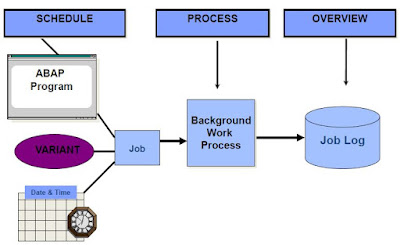
BACKGROUND PROCESSING Describe the process flow of background jobs Define the scheduling and processing of background jobs Describe the job results for a job log and spool requests Define the authorization objects Describe the automatic generation of jobs Define the function modules for generating jobs Characteristics Execution of ABAP programs without dialog (no specific job-control language for operating system required) Complete integration in the SAP System Parallel background and online operation Ease of use Distributed processing Process Flow Overview Process Flow Processing Jobs – Job Status Scheduled Released Ready Active Finished or Cancel Authorizations and Background Processing Authorization and background Processing Function Modules for Generating Jobs OB_OPEN JOB_SUBMIT OB_CLOSE Job Wizard You can use the Job wizard to schedule a background job. Let us go through the steps to do this. Transaction SM36 is listed below. Click the Job wizard button. The Job Wizard is displaye...

SAP ERP ABAP DEBUGGING

Image
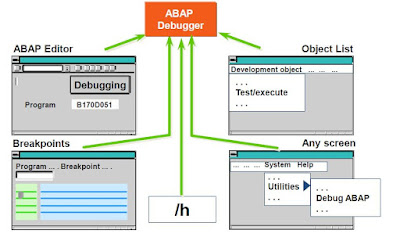
Module Objectives •Define debugging •Describe branching to debugging mode •Define key debugging concepts and functions •Explain the debugging mode •Describe examining/changing variables •Debugging in ADT •Identify breakpoints and watchpoints •Debug internal tables What is Debugging? •Tool used to identify and eliminate errors in ABAP programs •Allows the verification of program logic in a step-by-step manner by examining the results of individual statements Branching to Debugging Mode ABAP Debugging Key Debugging Concepts •Debugger modes •Examining the value of variables •Changing the value of variables •Setting breakpoints •Setting watchpoints •Viewing contents of internal tables Classic Debugging Display Below is the screen shot of how the debugger looks like. Classic Debugging Display Important Debugging Functions Single Step   -Processes the next program line Execute        -Allows the change of data contents during debugging Continue      -Pr...