Posts

Showing posts with the label ABAP control Statements

SAP ADOBE FORMS

Image
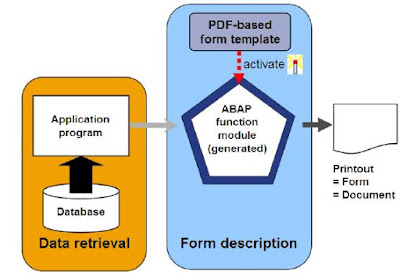
PDF-based print forms are a part of the Interactive Forms based on Adobe software package solution and are used for mass printing in SAP systems. as well as normal output on printers, and also the choice of archiving documents, you'll be able to additionally use your application to send a PDF to the Business Communication Services (BCS). Here, you've got the choice of faxing or e-mailing your documents. The following provides you a summary of how a PDF-based print kind is structured and additionally tells you the way to create a PDF-based print from within the development setting of the ABAP work bench. The integrated Adobe LiveCycle Designer software system supports you after you do that. This software system should be put in on your forepart before you'll be able to produce a layout. to visualize a print preview of your kind, you initially got to install Adobe Reader or an entire version of Adobe athlete. This documentation doesn't discuss however documents are wri...
INTRODUCTION TO SAP WEB DYNPRO

Image
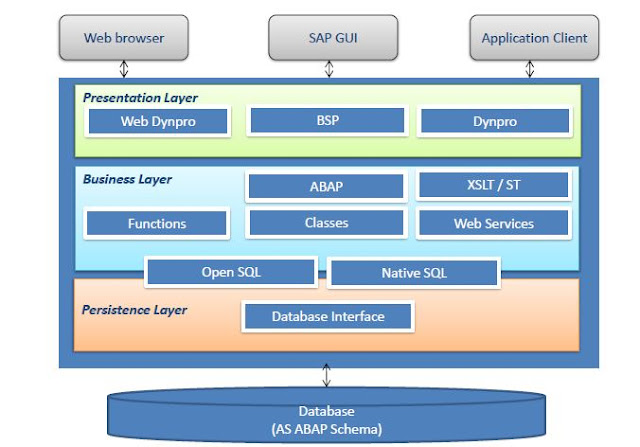
Web Dynpro is SAP’s standard UI technology for developing business applications with Web-based user interfaces.the web Dynpro is consists of a runtime environment and graphical development environment and tools that are integrated into the ABAP workbench.SAP Web Dynpro is based on original MVC design for decoupling presentation and application logic.Windows, Views, UI elements, Layouts, and Controllers form the basic components of a Web Dynpro application.Data binding is the means by which data is automatically transported from a view controller’s context to a UI element in its layout.Specific iViews should be created in order to run a Web Dynpro ABAP application within SAP enterprise portal.All WDA components, applications, and parts of the component are integrated parts of the standard correction and transport system (CTS).The standard ABAP lifecycle concepts fully apply to all Web Dynpro-based applications. Objectives goals: Explain the significance of Web Dynpro along with the We...

SUBROUTINES

Image
Module Objectives Define and call subroutines Define and use parameters Define global and local data Defining and Calling Subroutines  Defining a Subroutine: FORM subroutine USING lp1 lp2. ... ... ENDFORM. Calling a Subroutine: PERFORM subroutine USING f1 f2. Using Parameters to Pass Data CHANGING  Pass By Value & Result USING Pass By Reference   Pass By Value  TABLES   Pass By Reference  Parameters Example parameter  

OOP

Image
OOP Understand the details of object-oriented syntax elements in ABAP Objects and use these effectively Create object-oriented models of business applications Use the tools in the ADT 2.70 to develop object-oriented applications what problems we were having in Procedural programming. Long code due to variable declaration Extensive processing after SQL statement Multiple Commands to perform simple operations Code reusability and Maintenance SAP’s solution In-line declaration SQL Expressions ABAP Expressions OOP Advantages of OOP over Procedural programming Improved software structure and consistency in the development process Reduced maintenance efforts and less susceptibility to errors Better integration of the customer/user into the analysis, design, and maintenance process Easier and safer possibilities for extending the software OOP in ABAP Essentially the same as those of other modern object-oriented languages like C++ or Java Some elements present in ABAP objects are not offered i...

online Classes of SAP ERP ABAP 7.4 CONTROL STATEMENTS

Image
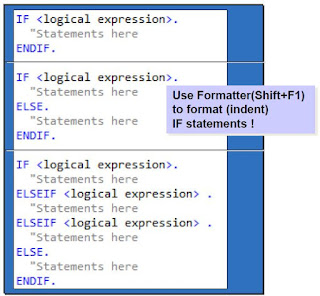
Module Objectives •Define Relational Operators •Explain Logical Expressions •Describe IF, CASE, SWITCH and COND statements •Explain DO and WHILE loops •Define CHECK, EXIT, and CONTINUE statements for use with loops IF Statement In every Programming language, we need conditional based code in ABAP, we use IF statement when we want to execute certain code based on any condition. for example, if the payment method is selected as credit card we want the particular code to execute and if payment method selects as cash we want some other code to execute. IF statements code Sample Relational Operators in order to compare variables we need some logical and relational operators which we can use to check the conditions and make decisions. for example, if the payment method is equal  Cash then we want the certain code to execute. to check if selected payment type is cash or not we use relational operators. Relational Operators Note: It is recommended to use symbols for relational op...