Posts

Showing posts with the label ABAP

SAP ADOBE FORMS

Image
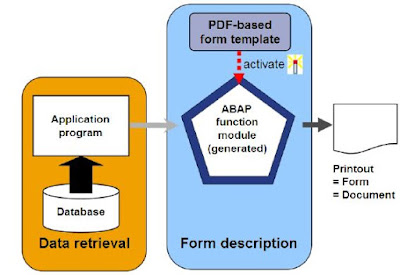
PDF-based print forms are a part of the Interactive Forms based on Adobe software package solution and are used for mass printing in SAP systems. as well as normal output on printers, and also the choice of archiving documents, you'll be able to additionally use your application to send a PDF to the Business Communication Services (BCS). Here, you've got the choice of faxing or e-mailing your documents. The following provides you a summary of how a PDF-based print kind is structured and additionally tells you the way to create a PDF-based print from within the development setting of the ABAP work bench. The integrated Adobe LiveCycle Designer software system supports you after you do that. This software system should be put in on your forepart before you'll be able to produce a layout. to visualize a print preview of your kind, you initially got to install Adobe Reader or an entire version of Adobe athlete. This documentation doesn't discuss however documents are wri...
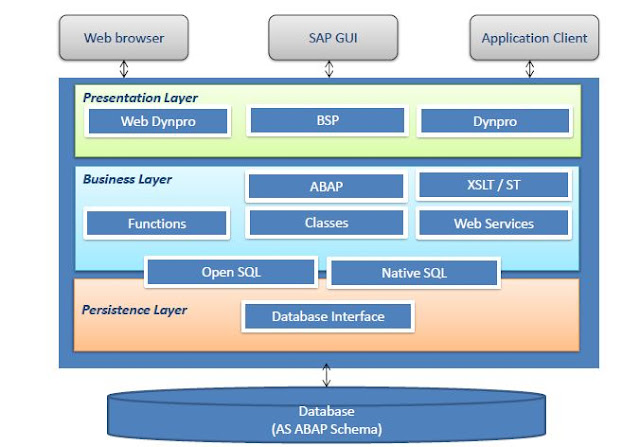
INTRODUCTION TO SAP WEB DYNPRO

Image
Web Dynpro is SAP’s standard UI technology for developing business applications with Web-based user interfaces.the web Dynpro is consists of a runtime environment and graphical development environment and tools that are integrated into the ABAP workbench.SAP Web Dynpro is based on original MVC design for decoupling presentation and application logic.Windows, Views, UI elements, Layouts, and Controllers form the basic components of a Web Dynpro application.Data binding is the means by which data is automatically transported from a view controller’s context to a UI element in its layout.Specific iViews should be created in order to run a Web Dynpro ABAP application within SAP enterprise portal.All WDA components, applications, and parts of the component are integrated parts of the standard correction and transport system (CTS).The standard ABAP lifecycle concepts fully apply to all Web Dynpro-based applications. Objectives goals: Explain the significance of Web Dynpro along with the We...

ABAP AUTHORIZATION CONCEPT

Image
ABAP AUTHORIZATION CONCEPT Describe SAP Authorization Concept Adding authorization checks to programs using AUTHORITYCHECK statement Authorization Concept  The SAP authorization concept was developed to protect transactions, programs, and services in SAP systems from unauthorized access. The administrator (usually from BASIS) assigns authorizations to users that determine which actions (transactions/programs) a user can execute in the SAP system. The authorizations represent instances of generic authorization objects and are defined by the activity and responsibilities of the employee. Adding Authorization Checks to Programs It is almost always a good practice to add authority checks to your custom developed programs. To add authorization checks to programs, you need to do the following:  Determine the Authorization Field/s  Determine the Authorization Object/s  Add Authorization Checks in your program Use the ABAP AUTHORITY-CHECK statement. Specify alphabetic values...

SEQUENTIAL FILES

Image
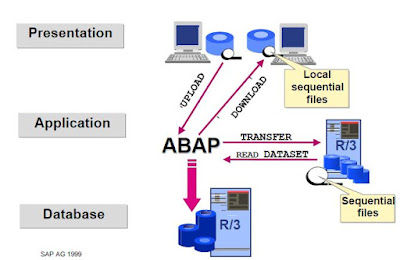
Module Objectives Describe the process of opening and closing files Define binary mode and text mode Define the TRANSFER and READ DATASET statements Define the CLOSE DATASET and DELETE DATASET statements Define ABAP statements to fill the fields of a structure Define the process for reading, extending and creating a file Data Imports and Exports Data imports and exports Processing Files there are three step of File processing. Open file Process file Close file Working with Sequential Files Reading Data OPEN DATASET <file name> FOR INPUT. : : READ <file name> INTO <field>. : : CLOSE DATASET <file name>. Writing Data  OPEN DATASET <file name> FOR OUTPUT. :   : TRANSFER <field> TO <file name>. :   : CLOSE DATASET <file name>. style="display:block" data-ad-format="fluid" data-ad-layout="image-side" data-ad-layout-key="-fg+5r+6h-fn+4k" data-ad-client="ca-pub-4708127434193346...

SUBROUTINES

Image
Module Objectives Define and call subroutines Define and use parameters Define global and local data Defining and Calling Subroutines  Defining a Subroutine: FORM subroutine USING lp1 lp2. ... ... ENDFORM. Calling a Subroutine: PERFORM subroutine USING f1 f2. Using Parameters to Pass Data CHANGING  Pass By Value & Result USING Pass By Reference   Pass By Value  TABLES   Pass By Reference  Parameters Example parameter  

ABAP UNIT

Image
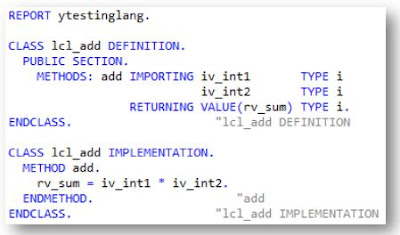
Module Objectives Purpose of ABAP Unit Creating Unit Tests Fixture Methods ABAP Unit Test Class Wizard ABAP Unit Test Classes in ADT Purpose of ABAP Unit ABAP Unit is part of the test landscape for ABAP programs. ABAP Unit lets you implement unit tests. ABAP unit tests are methods of specially designated ABAP classes. Test methods work as scripts, with which code under test can be run, and with which the results of a test can be evaluated. ABAP unit lets you test the code at unit level, independent of the entire solution. Creating Unit Tests ABAP unit tests are implemented in the form of test methods in local test classes in any ABAP programs. The expected results are checked with static methods of help class CL_ABAP_UNIT_ASSERT or CL_AUNIT_ASSERT . Unit test Test Properties Risk Level Harmless – the test does not affect any existing processes and/or Database data. Dangerous– the test will change Database or Persistent Data Critical – the test will affect customizing data Duration Sh...

BASIC ALV

Image
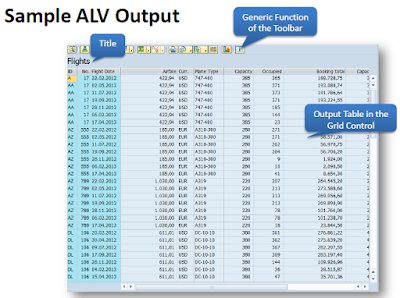
BASIC ALV •Define and describe ALV •Discuss and use the standard function module ‘REUSE_ALV_GRID_DISPLAY’ in ABAP program •ALV Navigation Define and Describe ALV The ALV (ABAP List Viewer) is a flexible tool for displaying lists in SAP. The tool provides common list operations as generic functions and can be enhanced by user-defined options. This allows you to use the ALV grid control in a wide range of application programs. For this module, the simplest way to use ALV will be discussed. Advanced topics in ALV may be discussed in the later part of the Training. Sample ALV Output Sample ALV output The ALV Field Catalog The field catalog is an internal table which contains information about the fields to be displayed on the ALV. The type is SLIS_T_FIELDCAT_ALV. We must first build the field catalog before displaying any output in the ALV. There are many fields in the field catalog but for a simple output, the only necessary fields are FIELDNAME and SELTEXT_L. Using the FM ‘REUSE_ALV_GRID...

ABAP TRANSACTION CODE AND EVENTS

Image
Module Objectives •Create transaction codes to load custom programs •Utilize ABAP Events to manage program processing Creating a Custom Transaction Code Creating a Custom Transaction Code we will click on ABAP Repository object and search for Transaction and write the object name. Creating A transaction Code  we will enter the transaction code and select the Start object type and enter the transection text and program name ABAP Events Events are declared through the event keyword Events are triggered when the program encounters a particular scenario (i.e. program is loaded, execution after selection screen, etc.) Events are terminated when any of these scenarios are met           -Declaration of another event           -Declaration of a subroutine or local method           -End of source code ABAP Event Keywords ABAP Events ABAP Events LOAD-OF-PROGRAM •Occurs prior to the loading of the selection screen •Inf...

SAP ABAP SELECT STATEMENT

Image
Module Objectives •Explain database Tables / data browser •Use the SELECT statement and the WHERE clause •Describe the SELECT SINGLE statement •Explain the ORDER BY addition •Describe retrieving individual columns •Exclude duplicate records during selection •Describe the SELECT statement syntax •Define aggregate expressions •Familiarization with ABAP 7.40 select statement new features •Discuss performance and best practices •SQL Console SELECT Statement - Basic Form the select statement is very simple in ABAP, we just use Keyword SELECT the we specified all columns of the table which we want to get we use * to show all columns with FROM keyword we specified the table. then we use a variable which will hold the result of the table and, in the end, we use ENDSELECT  to end the select query. Select Query Selecting specific fields from database table Selecting specific fields from database table Inline Declaration after INTO for ABAP 7.40 instead of defining all the fields in ABAP 7....